
Introduction
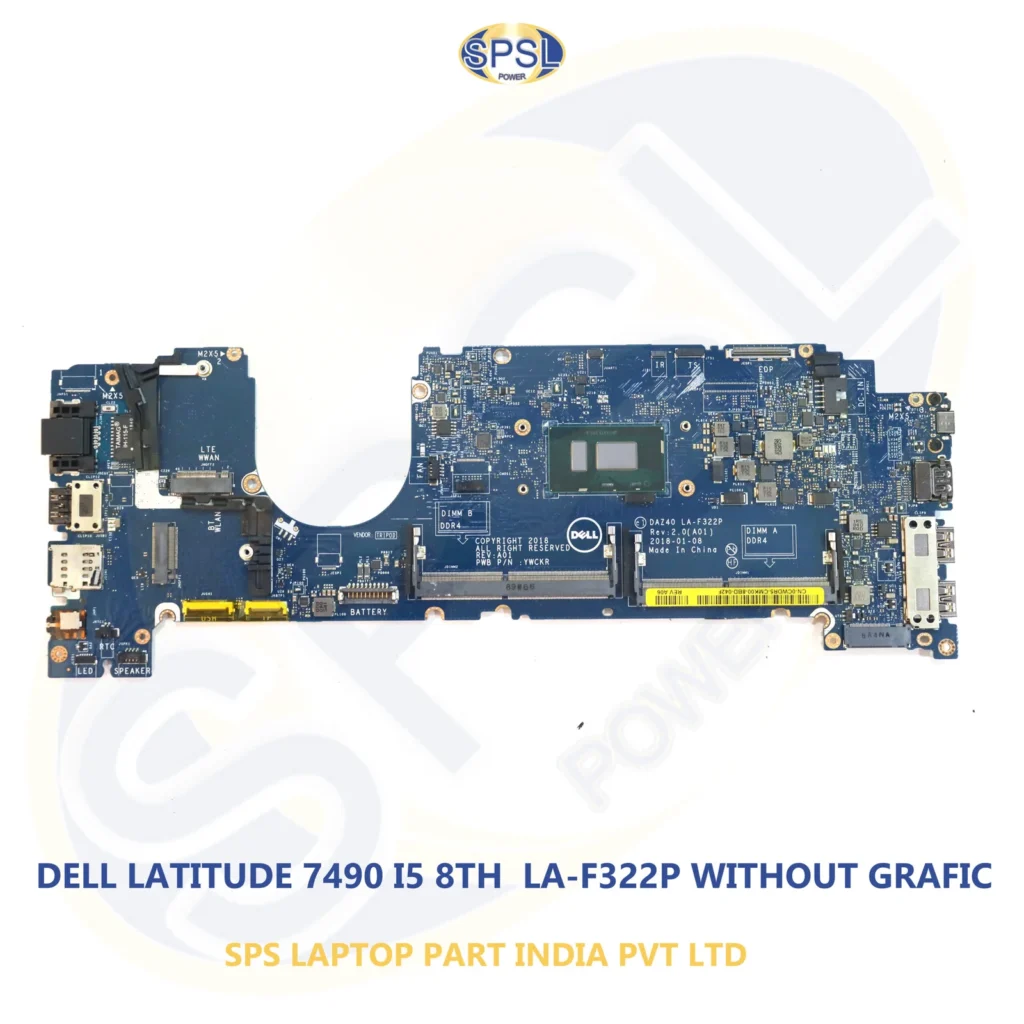
Dell Latitude 7490 is an advanced laptop computer that is famous for being highly durable, highly efficient and stylish. The laptop computer is very much preferred by professionals in business, students, IT companies, telecommuters, etc., who make use of it in all their daily functions. But there can be cases when electronics become faulty due to voltage fluctuations, fluid spillage, overheating, failure of hardware components, etc., and it is in such cases when it is always advisable to get a brand-new motherboard.
In case you are looking for the Best Dell Latitude 7490 Motherboard Replacement for Long-Lasting Performance, you have reached the right destination. Everything that is required to know about the product is discussed here.
Brand New Laptop Spare Parts can be purchased from SPS Laptop Parts India Private Limited through https://lapzoindia.com/.
Understanding the Dell Latitude 7490 Motherboard
The motherboard is your laptop’s main circuit board, which connects the processor, RAM, storage devices, display, keyboard, battery, cooling system, and all other internal hardware components. Your laptop cannot carry out any activity without an effectively working motherboard.
If your laptop motherboard stops working, the machine will not start or may crash very often and suffer from hardware failures. The selection of the best Dell Latitude 7490 Motherboard Replacement for Long-Lasting Performance guarantees your laptop’s continued reliable performance.
Possible Causes of Motherboard Failure
There are several ways how a motherboard can be ruined by the time.
1. Power Surge
Unexpected changes in voltage level may fry the components of your laptop motherboard.
2. Exposure to Liquids
Water or any liquid may short-circuit the motherboard components.
3. Overheating
The dust buildup and failure of the cooling fan may result in overheating the motherboard.
4. Physical Damage
Any drop or external pressure on your laptop may break its motherboard or internal circuits.
5. Motherboard Components’ Faults
The fault of the charging IC, capacitor, chipset, or power controller will make your motherboard useless.
Signs That Your Dell Latitude 7490 Needs a Motherboard Replacement
It would be wise to diagnose any motherboard problem early in order to avoid unnecessary cost and effort.
Symptoms to look for include the following:
- Laptop fails to boot up.
- Black screen despite the presence of a lit-up power indicator.
- Frequent and automatic rebooting.
- Non-working USB ports.
- Charging problems.
- Working display but no image on the screen.
- Unexpectedly freezing up.
- Overheating even when you clean the cooling fan.
- Hardware undetected in BIOS.
- A burning smell coming from the computer.
In case several symptoms occur at once, consider getting your motherboard replaced.
Benefits of Choosing an Original Motherboard
Buying an authentic replacement motherboard comes with many advantages compared to poor quality ones.
Ideal Compatibility
An original motherboard is manufactured in such a way that it can function well on Dell Latitude 7490.
Reliable Functioning
An original motherboard enables good coordination of all hardware devices within the laptop, hence reduced errors.
Durability
Components of high quality found in original motherboards are more durable.
Improved Safety
The original motherboards go through testing before being sold to ensure there is no malfunction.
Improved Resale Value
The laptop that is serviced using authentic parts has increased resale value compared to one that uses poor quality parts.
All these qualities make the Best Dell Latitude 7490 Motherboard Replacement for Long-Lasting Performance an ideal choice.
Dell Latitude 7490 Motherboard Features
The Dell Latitude 7490 motherboard is built to meet the requirements of contemporary business computing applications.
Some notable features are:
Compatibility with Intel Core processors (based on the model of motherboard)
- DDR4 memory capability
- Graphics integration
- Fast storage connections
- Various USB ports
- Support for HDMI/DisplayPort
- Wi-Fi and Bluetooth capabilities
- Power efficiency
- BIOS security capabilities
- Good thermal management
It is important to always check the specific model number of the motherboard when purchasing one.
How to Choose the Right Replacement Motherboard
There are several things to think about before acquiring a new motherboard.
Verify Laptop Model
Check if the laptop you own is a Dell Latitude 7490 and determine the model number.
Motherboard Part Number
There could be different motherboard revisions even if they are intended for the same laptop model. Checking the motherboard part number guarantees compatibility.
Processor Compatibility
Not all motherboards have built-in processors; some are compatible only with certain CPU configurations.
RAM Compatibility
The replacement motherboard should support the kind of RAM your laptop uses.
Ports Configuration
Compare the number of USB ports, video ports, audio ports, and charger ports on the new motherboard with those of the old one.
Buy from a Reliable Supplier
It will help if you buy from a professional to guarantee that you are getting a good-quality motherboard.
Things to Check Before Buying a Dell Latitude 7490 Motherboard
It is vital to get a new motherboard, and selecting a suitable one saves you time and money. The following specifications need to be checked before ordering a new motherboard:
1. Motherboard Part Number
Make sure that the part number of the current motherboard and the new motherboard are exactly the same. Despite similar looking motherboards, they might differ in their chipset revisions and connector arrangement.
2. Processor Version
There are different processor versions of the Dell Latitude 7490. You should make sure that the new motherboard corresponds to your processor version.
3. RAM Compatibility
It is necessary to check if your new motherboard is compatible with the RAM type and size used in your laptop.
4. Port Arrangement
Make sure the arrangement of the USB ports, HDMI port, charging port, LAN port, and audio port is the same as that of your original motherboard.
5. Quality of Product
Select an already tested motherboard from a reliable source and not a low-quality one.
Choosing the Right Dell Latitude 7490 Motherboard Replacement for Reliable Performance makes sure your laptop works properly.
Installation Tips
Though replacement of motherboard can be achieved by technicians with experience, successful installation should be ensured.
Here are some of the tips:
- Ensure you have backed up important data prior to commencing.
- Remove the battery before removing any internal components.
- Carefully arrange the screws during disassembly.
- Clean the cooling fan and heatsink before reassembly.
- Apply fresh thermal paste when necessary.
- Connect all ribbon cables properly.
- Conduct a hardware test after installation.
It is best to have the motherboard installed by an experienced technician if you are not familiar with laptop hardware.
Why Genuine Motherboards Are Better Than Duplicate Products
While some customers prefer cheaper options in order to cut down costs, it is common knowledge that clone motherboards affect the performance and quality of your computer.
The advantages associated with using an authentic motherboard include the following:
- System stability
- Enhanced hardware compatibility
- Quality electronics
- Effective cooling capabilities
- Increased lifespan
- Decreased chances of hardware damage
- Overall enhanced reliability
The Best Dell Latitude 7490 Motherboard Replacement for Years of Optimal Performance is a better investment than buying cheap replacement options.
Why Buy from SPS Laptop Parts India Private Limited?
It is equally essential to get a good supplier as well as to choose the right motherboard. SPS Laptop Parts India Private Limited is a reputable company that supplies authentic and quality-tested laptop spare parts for a number of laptop makes.
Reasons why customers opt for SPS Laptop Parts India Private Limited are:
- Authentic laptop spare parts
- Quality tested products
- Affordable prices
- Plenty of stock of laptop motherboards
- Safe packaging
- Quick delivery all over India
- Superb customer care service
A wide range of parts for Dell, HP, Lenovo, Acer, Asus, Apple, MSI, Samsung, Toshiba, Sony, and many other laptop makes
If you are a common man, an IT specialist, a technician or even a dealer then SPS Laptop Parts India Private Limited will provide you with reliable solutions for your laptop spare parts needs.
Buy Genuine Dell Latitude 7490 Motherboard Online
For genuine laptop spare parts, please go to http://www.lapzoindia.com.
This site features an extensive list of genuine laptop parts, which include:
- Laptop motherboards
- Laptop screens
- Laptop keyboards
- Laptop batteries
- Laptop chargers
- Cooling fans
- Hinges
- RAM
- SSDs
- Laptop accessories
All products have been selected with the aim of enabling customers to repair their laptops through quality replacements.
Maintenance Tips After Motherboard Replacement
After the new motherboard is installed in your laptop, correct maintenance can greatly extend its lifespan.
Here are some valuable suggestions:
- Ensure that the laptop is kept clean and free of any dust particles.
- Do not block the air passages.
- Use the authentic charger.
- Shield the laptop from any form of water damage.
- Update the laptop on a regular basis.
- Do not operate the laptop on a soft surface.
- Always switch off the laptop instead of forcibly shutting it down.
- Plug in the laptop with a surge protector.
- Regularly check the cooling fan for dust particles.
- Store the laptop in a case while traveling.
Frequently Asked Questions (FAQs)
- How do I determine the appropriate Dell Latitude 7490 motherboard?
Refer to the computer’s model number and the motherboard part number present on the current motherboard before placing an order.
- Is there any possibility of replacing the motherboard instead of getting a new laptop?
Yes, because if all other components of the laptop are working fine, then changing the motherboard may be a cost-effective choice.
- Is it necessary to buy the genuine motherboard?
Certainly, because a genuine motherboard gives you better results than a cheap one.
- Will changing the motherboard increase the efficiency of the laptop?
Yes, because a faulty motherboard causes problems for the system.
Conclusion
It is very important to have an efficient motherboard in order to make your laptop perform well. So in case your old motherboard was damaged because of electrical problems, overheating, and physical damages, buying the Best Dell Latitude 7490 Motherboard Replacement for Long-Lasting Performance will be your best choice.
Always ensure before making any purchase about the compatibility of the motherboard, motherboard model number, processor information, and quality of the product in order to buy genuine components and avoid fake products.
In order to get high-quality replacement motherboards and other laptop spare parts, visit our company. SPS Laptop Parts India Private Limited offers you genuine laptop motherboards, laptop battery, laptop screen, laptop keyboard, charger, RAM, SSD, and other accessories of various leading laptop brands at lapzoindia.com.
With genuine replacement components for laptops, you can significantly extend the working time of your device.
Keywords: Keyword Best Dell Latitude 7490 Motherboard Replacement for Long-Lasting Performance has been used 5 times in Part 1 and Part 2.