
Introduction
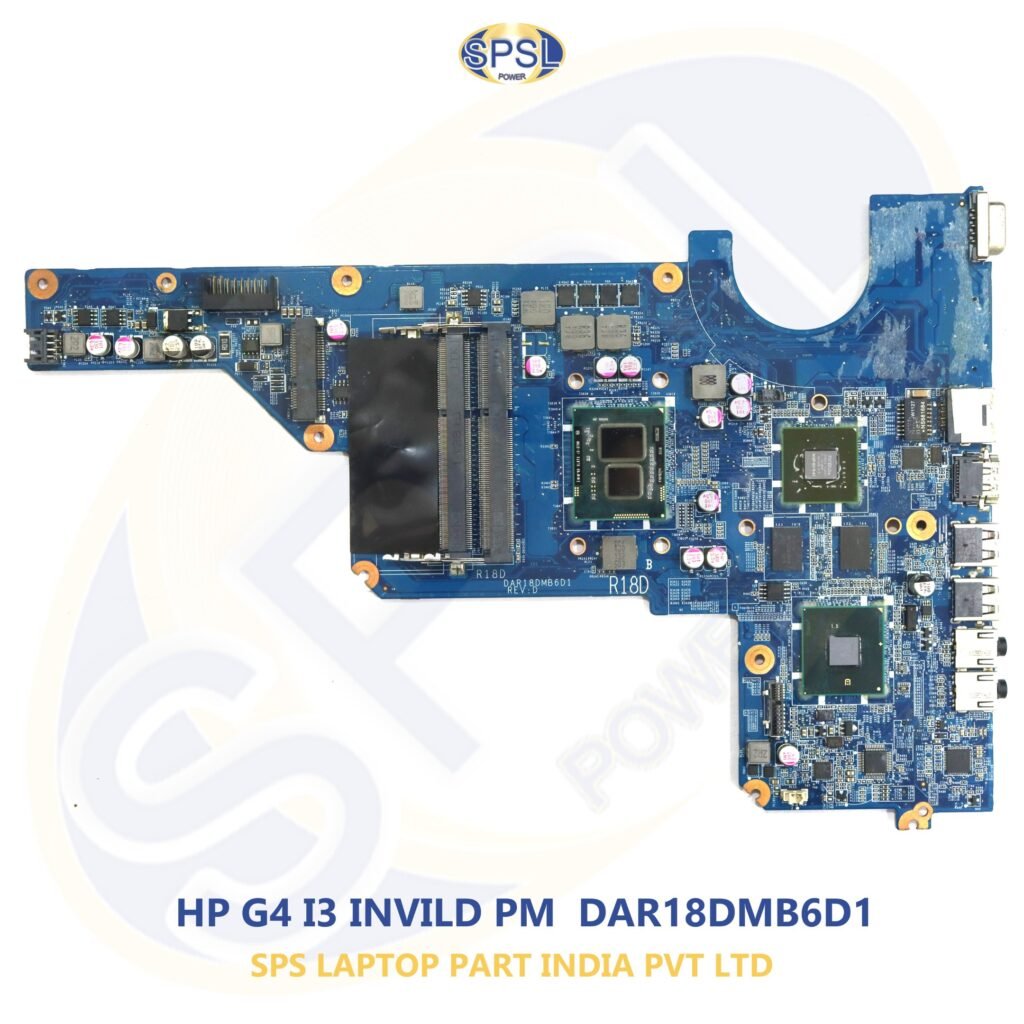
In the modern technological age, laptops have become an inevitable aspect of our day-to-day activities. Be it an online class, be it a project work, be it any kind of creative task, or be it gaming, the laptop remains the most valuable asset that you could have. In every single laptop, there comes a motherboard which acts as the central unit to control all the other hardware within your computer.
Whenever your motherboard stops working, your laptop becomes totally unresponsive. People tend to think that they require a replacement of their laptop; however, a Motherboard Replacement can prove to be an economical option than buying a whole new computer as through Motherboard Replacement, you would be able to revive the functionalities of your laptop and keep your screen, RAM, SSD, keyboard, battery, and other compatible hardware intact.
When it comes to genuine laptop motherboards for Dell, HP, Lenovo, Acer, Asus, Apple, MSI, Samsung, and other famous brands, SPS Laptop Parts India Private Limited provides a range of quality tested laptop motherboards at reasonable prices with PAN India delivery services.
What is a Laptop Motherboard?
The motherboard is often called the “brain” or “heart” of a laptop since all its key hardware parts are connected within one system. Without the motherboard, there is no way for the processor, memory, storage device, screen, battery, keyboard, and USB ports to be able to communicate with each other.
A laptop motherboard consists of several electronic elements, such as:
Processor socket or embedded processor;
- RAM slots;
- Graphic card chipset;
- Power supply units;
- BIOS chip;
- Charging unit;
- Audio controller;
- USB controller;
- Connector for the screen;
- SSD/HDD interface;
- Wi-Fi module connector;
- Cooling fan connector;
and so on.
Every signal in a laptop goes through the motherboard, which makes it the most important part of the whole device.
Why is the Motherboard Important?
Functions of the Motherboard include the following:
- Linkage of all the internal hardware components
- Providing power to various components of the laptop
- Facilitating communication between the processor, memory, and storage
- Graphics rendering
- Management of the USB, HDMI, audio, and network ports
- Control of system boot through BIOS
- Stability of the computer while operating
In case of damage to the motherboard, your laptop will not be able to function properly.
Common Reasons for Motherboard Failure
Despite being quite durable, laptop motherboards might get damaged because of different reasons. Being aware of them will help you avoid any kind of damage or decide whether it is necessary to conduct a Motherboard Replacement procedure.
1. Liquid Damage
Accidental spills of water, tea, coffee or other liquids may lead to a short circuit which will damage the motherboard.
2. Power Surges & Voltage Fluctuations
The use of low quality chargers and unstable power supply can burn charging circuits and power management chips which will damage your motherboard.
3. Overheating
Overheating is one of the most frequent reasons for the damage of your motherboard. It can be caused by the dust on the device, clogged air vents, dry thermal paste inside it.
4. Physical Injury
Injuries from accidentally dropped laptop or excessive pressure on it might break the motherboard or loose internal connections.
5. Component Failure
After many years of usage some motherboard components like capacitors, voltage regulators or integrated circuits may wear out and work improperly.
6. Electric Short Circuit
Faulty repair, adapter or USB device can cause an electric short circuit which will irreparably damage your motherboard.
Signs That Your Laptop Needs a Motherboard Replacement
Failure of the motherboard may manifest through warning signals prior to its actual failure. Should you experience the following problems, then you may want to opt for Motherboard Replacement.
No Response from Laptop
The most usual symptom is where your laptop fails to react despite plugging in the charger.
Blank Display
The power light may go on, but the screen stays blank and shows no display at all.
Shutdowns Occur Randomly
Shutdowns occurring randomly while in the middle of usage may suggest either motherboard failure or power circuit failure.
Battery Does Not Charge
Despite using an original charger, should your battery not charge, it may suggest a bad charging IC or motherboard problem.
Multiple Malfunctioning USB Ports
Malfunctioning of several USB ports may suggest the need for a motherboard replacement.
Laptops that Beep During Start-up
Sometimes, laptops have beep codes during start-up which indicate a hardware or motherboard issue.
Burning Smell Coming From Laptop
Burning smell or burn marks on the motherboard usually indicate severe electrical damage.
Why Choose Motherboard Replacement Instead of Buying a New Laptop?
A lot of laptop users think that a damaged motherboard will be the reason for them having to dispose of their laptop. But this is not necessarily true. Most of the time, Motherboard Replacement will prove to be an effective and economical way to get your laptop back in shape without having to invest in a new one.
By replacing just the problematic motherboard, you can keep on using your existing laptop along with all of its essential parts like screen, RAM, SSD, keyboard, battery, speakers, camera, and touchpad. This not only makes it economically viable but also eco-friendly.
Some of the major advantages are as follows:
1. Economic Benefit
Purchasing a new laptop may prove costly in case you have a business class or gaming laptop. Getting a replacement for the motherboard proves considerably cheaper but with the same features.
2. Faster Process
As opposed to spending valuable time in transferring data and installing a new computer, replacing the motherboard lets you bring your current laptop back into action within a short time.
3. Using your Current Parts
In case the display, RAM, hard disk drive, battery and keyboard are in good working condition, there is no need to change them. The appropriate motherboard enables you to use the parts as they are.
4. Eco-friendly
E-waste has become an increasing problem globally. Opting for Motherboard Replacement is one way of reducing e-waste.
Genuine vs. Duplicate Laptop Motherboards
In the process of buying the motherboard, one should be careful about the quality of the product. There are many websites offering cheap products on the Internet, but not all of them are equally reliable.
Genuine Laptop Motherboards
There are many benefits of genuine motherboards:
- Hardware compatibility
- Stability of the operation
- Larger lifespan
- Good performance regarding power supply
- Efficient charging
- Thermal efficiency
- No risk of failure of the hardware
Duplicate or Low-Quality Motherboards
A cheap alternative board can look very appealing due to its reduced cost; however, it comes with several disadvantages.
Incompatibility problem
Low-quality construction
Shorter life span
Overheating problem
System crashes randomly
Less efficient performance
Higher chances of malfunction
By purchasing an authentic motherboard, one can avoid all these problems.
How to Choose the Right Laptop Motherboard
Selecting the correct motherboard is essential for proper laptop functionality. Before purchasing, verify the following details carefully.
Determine Your Laptop Model Number
Each laptop model carries an individual model number that can be found on the bottom panel or in the battery compartment.
Here are some examples:
- Dell Latitude 5420
- HP ProBook 440 G8
- Lenovo ThinkPad T490
- Acer Aspire A315
- Asus VivoBook X515
Confirming the Motherboard Board Number
Most laptop motherboards have an individual board number printed right on the board itself.
Here are some examples:
- LA-G071P
- LA-F115P
- NM-C711
- DA0XYZMB8D0
The board number is one of the safest ways to identify the proper laptop motherboard.
Processor Type
The processor in laptop motherboards can vary.
Some examples are:
- Intel Core i3
- Intel Core i5
- Intel Core i7
- Intel Core i9
- AMD Ryzen 3
- AMD Ryzen 5
- AMD Ryzen 7
Some processors are removable, and some processors are soldered onto the motherboard. Check the type of processor in your device first.
Graphics Version
Many laptop models are available in different graphics versions.
Some examples are:
- Integrated Intel Graphics
- AMD Radeon Graphics
- NVIDIA Dedicated Graphics
Selecting the wrong graphics version may cause your monitor and other hardware not to work properly.
Common Mistakes to Avoid When Buying a Motherboard
Purchasing the wrong motherboard may cause delays and extra expenses. Here are some mistakes to avoid:
Ignores the Board Number
Users buy a motherboard for their laptop just because of its name, although the same laptop may use different board models.
Selects the Cheapest One
Too inexpensive motherboards may not be tested, and they may easily burn out.
Neglects Processor Version
You should always check whether your motherboard works with your particular version of the processor.
Neglects the Version of Graphics
The integrated and dedicated graphics boards are often not compatible.
Purchases without Verification
If you are not sure about something, it is better to contact a specialist in the shop.
Why Buy Laptop Motherboards Online?
Online purchasing has greatly simplified the procurement of genuine spares for laptops. There is no need to visit many physical markets since one is able to look at an extensive range of products from the comforts of their offices and homes.
Advantages of buying online include:
- Extensive range of motherboard types
- Competitive prices
- Facility for comparing product features
- Inclusive range of discontinued motherboard types
- Ease of the purchase procedure
- PAN India delivery services
- Secure transaction process
- Professional customer care services
At SPS Laptop Parts India Private Limited, buyers have access to an extensive range of genuine motherboards of laptops from top manufacturers.
Who Can Benefit from a Motherboard Replacement?
Motherboard Replacement makes an excellent choice for various individuals such as:
- Students requiring dependable laptops for educational purposes
- Remote office employees
- Businesspersons wishing to cut down on IT expenses
- Computer technicians
- Companies having many computers
- Institutions of learning
- Freelancers and designers
- Gamers using powerful laptops
- Laptops resellers
A motherboard replacement will make your laptop last longer and enable you to keep on using it.
Choosing a Trusted Supplier
The quality of the replacement motherboard is determined by the vendor you opt to buy from. Buying a laptop motherboard from a reliable manufacturer will significantly minimize chances of acquiring a wrong motherboard.
SPS Laptop Parts India Private Limited aims at delivering quality-tested laptop motherboards, excellent customer service, well-packed motherboards, and timely delivery in India. Whether for personal use or for commercial purposes, opting for a reliable supplier will ensure satisfaction.
Laptop Motherboards Available for Leading Brands
All laptop manufacturers have their motherboards made uniquely to fit certain processors, graphics, and other hardware elements. It is very necessary for the selection of an appropriate motherboard to ensure stability. At SPS Laptop Parts India Private Limited, one can get quality assured motherboards for some of the best laptop brands in the world.
Dell Laptop Motherboards
Dell laptops have been popular among students, professionals, companies, and schools. No matter what series your Dell laptop is, Inspiron, Latitude, Precision, Vostro, XPS, and Alienware, selecting the right motherboard is crucial.
Some of the Dell series are:
- Dell Latitude
- Dell Inspiron
- Dell Precision
- Dell Vostro
- Dell XPS
- Dell Alienware
Some Dell laptops come with Intel or NVIDIA graphics, so it is very necessary to select the exact part number of the motherboard.
HP Laptop Motherboards
HP laptops are known to be durable and perform well in business conditions. HP supplies various motherboards according to the processor generation and graphics.
Some common series of HP include:
- HP Pavilion
- HP ProBook
- HP EliteBook
- HP Envy
- HP Omen
- HP Victus
It is important to confirm motherboard and processor compatibility prior to purchasing.
Motherboards of Lenovo Laptops
Lenovo designs laptops not only for businesses but also for individuals. ThinkPad series are especially popular in professional use, whereas IdeaPad series are used frequently by students.
Some Lenovo series supported by our service are as follows:
- ThinkPad
- IdeaPad
- Legion
- Yoga
- ThinkBook
The motherboard version varies across models; therefore, it is recommended to check the board number.
Acer Laptop Motherboards
Acer laptops offer good value for money to students and office workers. Popular motherboard brands are:
- Acer Aspire
- Acer Nitro
- Acer Predator
- Acer Swift
- Acer TravelMate
The motherboards differ based on the CPU family and the graphics chipset.
Asus Laptop Motherboards
There are many different product ranges of Asus laptops suited for personal, creative, and gaming purposes.
Popular series are:
- VivoBook
- ZenBook
- TUF Gaming
- ROG
- ExpertBook
Choosing the right motherboard makes sure that it will fit your monitor, keyboard, battery, and other storage media.
Apple MacBook Logic Boards
The logic board is utilized in Apple laptops rather than the regular motherboards used in PCs. Since there are several key components on such boards, choosing the right one is very crucial.
The following models are supported:
MacBook Air
MacBook Pro
Check the exact model number before buying.
MSI, Samsung, Toshiba, and Other Brands
Apart from popular brands, SPS Laptop Parts India Private Limited offers motherboards that are compatible with the following brands too:
- MSI
- Samsung
- Toshiba
- Sony
- Fujitsu
- LG
Xiaomi (select models)
Tips for Professional Installation
After buying a new motherboard, proper installation becomes a priority. Although the installation process will be safe for those who know how to handle hardware, it is highly advisable to go for professional installation for those who lack skills.
Steps involved in the installation process include:
- Disconnection of the battery
- Unscrewing all the screws and keeping them safe.
- Using anti-static when handling the motherboard
- Shifting of compatible parts including RAM, SSD, Wi-Fi, and cooling fan.
- Application of new thermal paste on the CPU.
- Connection of ribbon cables
Checking all the connections before switching on the laptop.
Essential Maintenance Tips After Motherboard Replacement
Maintenance will help you to extend the life of your new motherboard as much as possible.
Keep Your Laptop Clean
Dust interferes with airflow and raises the temperature inside the laptop. Use compressed air or have the laptop cleaned from time to time.
Use an Original Charger
Poor chargers can supply unstable voltage, damaging the charging circuit and motherboard over time.
Prevent Overheating
Do not use your laptop on beds or pillows because these surfaces will block ventilation. Use a cooling pad if you are going to work with games or videos.
Protect Your Laptop from Power Fluctuations
The use of good surge protector or UPS will lower the risk of damaging your motherboard due to unstable electricity.
Keep Your Laptop away from Liquids
Even a drop of liquid can irreversibly damage electronic circuits of your laptop. Use it only in clean and dry places.
Update BIOS Carefully
If there is any need to update BIOS according to the recommendations of the manufacturer, be sure to do this without any interruptions.
Why Buy from SPS Laptop Parts India Private Limited?
Just like finding a motherboard that suits your requirements, locating a reliable supplier is equally crucial. SPS Laptop Parts India Private Limited has been able to create a name for itself by providing their customers with original and tested laptop spares in India.
The customers select the company because of the following reasons:
- Original laptop motherboards from leading companies
- Quality-tested items
- Vast selection of laptop spare parts
- Competitive rates
- Availability of motherboards for discontinued and older models
- Anti-static packing
- Nationwide delivery
- Excellent customer support
- Products that suit individual as well as business purposes
Be it a single computer or multiple systems, the company provides you with reliable motherboards as per your requirements.
Concluding Remarks
However, a faulty motherboard does not always signify that your laptop has been rendered obsolete. It is quite feasible and economical to opt for Motherboard Replacement in several cases. This way, by making sure that you choose a genuine motherboard, which is compatible with your laptop, and purchase it from a legitimate source, you will be able to give a new lease of life to your laptop without incurring huge expenses on a brand new computer.
For sourcing authentic and compatible laptop motherboards for Dell, HP, Lenovo, Acer, Asus, Apple, MSI, Samsung and many more brands, SPS Laptop Parts India Private Limited is the right destination for you. The organization provides a large assortment of quality products along with competent customer support, competitive rates, and quick delivery all over India.
Opting for the right motherboard in today’s era signifies reliable performance and longevity of your laptop in the coming years.