
Introduction
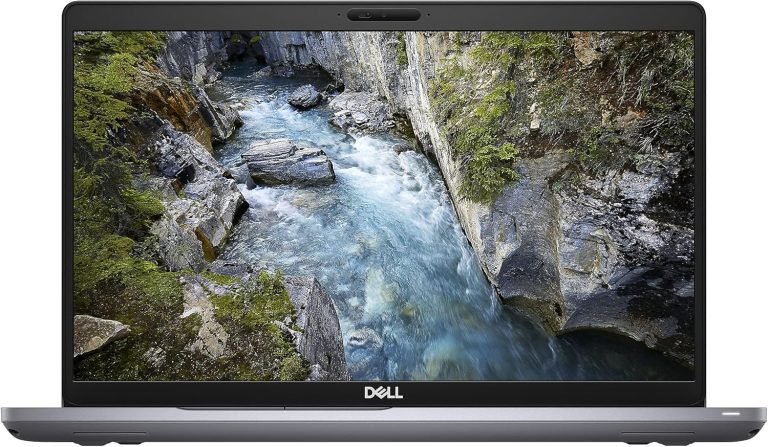
Picking a suitable workstation laptop is essential for people who need a reliable performance daily. If you are an engineer, architect, graphic designer, software developer or content creator, you need a laptop that will provide you with a fast and stable work, and high performance. The Dell Precision 3551 Laptop is one of the most reliable and powerful machines that was developed by Dell Company to meet those requirements.
This laptop represents one of the Precision line of laptops of Dell Company and is specially designed for people who use such software as CAD, 3D modeling, video editing, programming and other software with heavy demands. These kinds of machines usually do not have the same features as consumer laptops.
This review will help you to understand more about the design, display, processors, graphics, memory, storage, battery life, security, and upgrading abilities of this workstation. You will be able to decide whether this machine is right for you.
Overview of Dell Precision 3551 Laptop
The Dell Precision 3551 Laptop is a 15.6-inch mobile workstation by Dell for users who need desktop-like performance in a mobile device. It comes with 10th Generation Intel Core™ and Intel Xeon® processors, along with professional NVIDIA Quadro graphics support.
As compared to gaming laptops that are mainly used for fun, Precision workstations are built with the goal of being reliable, performing well, and getting professional certification. Many industries, including engineering, architecture, product design, media production, and software development, usually employ Dell Precision workstations due to their performance dependability.
It is capable of handling long hours of work along with steady performance.
Design and Build Quality
Professional and robust construction are among the best aspects of the Dell Precision 3551 Laptop. This workstation was created by Dell specifically for business people to have an aesthetically pleasing and robust device that will survive regular use.
The design includes a sleek, black, and elegant exterior that will fit any office or classroom environment. The hinge of the device is very reliable and allows easy and smooth opening and closing of the screen.
Despite being equipped with top-notch hardware, the laptop is fairly portable and thus can be used by professionals moving from one place to another.
Display Quality
The display is critical to productivity, especially when handling graphics or huge spreadsheets.
The Dell Precision 3551 Laptop has a 15.6 inch display which comes in several variations, namely:
HD (1366 x 768)
Full HD (1920 x 1080)
The Full HD IPS Display is ideal for most people since it provides the following advantages:
- Sharper text
- Accurate colours
- Broad viewing angles
- Increased brightness
- Prevents eye strain while working for prolonged periods of time
Graphic designers, photo editors, and video producers will greatly appreciate the Full HD Display.
Processor Performance
Performance is among the best features of the Dell Precision 3551 Laptop.
Dell provides various processors:
- Intel Core i5 10th Generation
- Intel Core i7 10th Generation
- Intel Core i9 10th Generation
- Intel Xeon processors (select models)
These processors ensure superb performance in:
- AutoCAD
- SolidWorks
- Photoshop
- Premiere Pro
- Revit
- MATLAB
- Coding
- Virtualization
- Database management
- Office applications
The Intel Xeon model is especially appealing to professionals looking for added stability and error correcting code memory.
Professional Graphics Performance
Unlike other consumer laptops which use gaming GPUs, the Dell Precision 3551 Laptop uses NVIDIA Quadro pro graphics on numerous configurations.
The available graphics cards on this laptop are:
- Intel UHD Graphics
- NVIDIA Quadro P620
- NVIDIA Quadro P520 (selected configurations)
The Quadro graphics card is certified in many professional applications, making it more stable and optimized than ordinary gaming graphics cards.
Quadro GPUs excel at:
- CAD modeling
- Engineering simulation
- 3D rendering
- Building Information Modeling
- Geographic Information System
- Professional visualization
- Medical imaging
Quadro graphics cards have a great advantage for those who require certified drivers and application stability.
Memory (RAM)
The Dell Precision 3551 Laptop is able to operate with DDR4 memory and provides good possibilities for upgrading.
Depending on the model, the user may use:
- 8 GB RAM
- 16 GB RAM
- 32 GB RAM
- up to 64 GB DDR4 RAM
The larger memory capacity allows professionals to work with several programs at once without any lags
Larger RAM configuration is especially helpful for:
- Creating virtual machines
- Editing videos
- Programming
- Analyzing data
- Working on engineering projects
Moreover, upgrade options extend the service period of the laptop.
Storage Options
High-speed storage is important for current business workloads.
The Dell Precision 3551 Laptop includes:
- PCIe NVMe SSD
- M.2 SSD
- SATA SSD (some configurations only)
Storage options include:
- 256 GB SSD
- 512 GB SSD
- 1 TB SSD
- 2 TB SSD (some configurations only)
Use of NVMe SSDs offers the following benefits:
- Speedier Windows startup
- Rapid program load times
- Increased file transfer speeds
- Enhanced multitasking capabilities
Decreased wait times when opening large projects
Business people who work with big files will definitely appreciate NVMe storage’s increased speed.
Keyboard and Touchpad
Dell has provided a convenient full-sized keyboard that can be used comfortably to type long documents.
The keyboard has:
- Sufficient key travel
- Good spacing between keys
- A numeric keypad
- Good typing comfort
The touchpad allows Windows Precision drivers, which offer precise gesture control.
For people who type reports, program codes, or other documents for hours, the keyboard makes it easy to type.
Audio and Webcam
This laptop is equipped with inbuilt stereo speakers which can be used for:
- Video conferencing
- Online meeting
- Multimedia viewing
- Online learning/training
The in-built HD camera provides quality video transmission for applications such as:
- Microsoft Teams
- Zoom
- Google Meet
- Cisco Webex
The dual array microphones increase voice quality while participating in online meetings.
Battery Life
The power consumption of the machine varies depending on the hardware settings and usage.
In case of normal office work like:
- Editing documents
- Browsing the internet
- Video conferences
- E-mails
- A user can get several productive hours on one full charge.
Some intensive software like 3D graphics, video processing consumes more power, that is why users often use the laptop with it connected to the charger while working with such programs.
Operating system
The Dell Precision 3551 Laptop works with:
- Windows 10 Pro
- Windows 11 Pro (supported with compatible configurations)
- Ubuntu Linux (some versions)
Business users usually choose Windows Pro as an operating system due to additional security features.
Connectivity and Ports
Another feature which contributes greatly to the success of the Dell Precision 3551 Laptop is its great choice of available connectivity options. Contrary to other ultrabooks that lack some crucial ports, the Dell Precision 3551 laptop provides a variety of connectivity options for professionals who use external displays, hard drives, networking, and peripheral devices.
In different configurations, the laptop has:
- USB 3.2 Gen 1 Type-A ports
- Thunderbolt™ 3 enabled USB Type-C
- HDMI output
- RJ-45 Ethernet port
- SD card slot
- Audio jack
- Power jack
One of the greatest advantages of Thunderbolt™ 3 is its ability to provide high-speed data transfer, external display outputs, docking capabilities, and high-speed drives using one single port.
Wireless Connectivity
The Dell Precision 3551 Laptop comes with contemporary wireless communication capabilities.
Some of which include:
- Wi-Fi 6 (in compatible models)
- Bluetooth 5.0
Wi-Fi 6 delivers:
- Higher wireless speed
- Greater efficiency in dense office networks
- Decreased latency
- Enhanced reliability in video conferences
Bluetooth helps you easily connect peripheral devices such as wireless keyboards, mice, headsets, printers, etc.
Security Features
Security is among the reasons that make many firms opt for Dell Precision workstations.
Among the security solutions available on the Dell Precision 3551 Laptop are:
- Fingerprint reader
- TPM (Trusted Platform Module)
- Smart Card Reader
- Kensington Lock Slot
- BIOS security solutions
- Dell SafeBIOS compatibility
All these solutions ensure protection of sensitive business information, making this laptop the right choice for companies concerned about security.
Upgrade Options
In contrast to thin-and-light laptops that have their components soldered, the Dell Precision 3551 Laptop has good upgradeability.
RAM Upgrades
This device allows you to increase RAM capacity by upgrading your memory.
RAM upgrades are useful when dealing with:
- Large spreadsheets
- Virtual machines
- Adobe Creative Cloud
- AutoCAD
- Programming
- Multitasking
- SSD Upgrades
Besides RAM, SSD can also be upgraded to increase storage.
Professional people prefer bigger NVMe SSDs for:
- Project loading
- Additional file storage
- Application performance
Performance for Professional Applications
One of the most outstanding qualities about the Dell Precision 3551 Laptop is the efficiency with which it handles professional software.
The Dell Precision laptop works well with the following software:
CAD Software
- AutoCAD
- SolidWorks
- CATIA
- Creo
Adobe Creative Applications
- Photoshop
- Illustrator
- Premiere Pro
- After Effects
- Lightroom
Engineering Applications
- MATLAB
- ANSYS
- Revit
- Software Development
- Visual Studio
- IntelliJ IDEA
- Android Studio
- Docker
- Virtual Machines
Since Dell Precision laptops are certified for various professional software applications, they normally provide greater stability than consumer laptops.
Cooling and Thermal Performance
Professional workloads put a lot of pressure on the hardware of laptops. The Precision 3551 comes with an effective cooling system to ensure performance remains steady during extensive professional use.
These features include:
- Effective heat pipes
- Cooling fan
- Airflow
Good thermal management ensures there is no throttling while running tasks like rendering, compiling code, and large data sets.
Cleaning the cooling system regularly is a good way to keep the performance at its best.
Advantages of Dell Precision 3551 Laptop
There are several pros of choosing the Dell Precision 3551 Laptop for professionals.
Pros
- Great workstation performance
- Strong 10th Generation Intel processors
- Professional NVIDIA Quadro graphics
- Upgradable RAM and SSD
- Business class build quality
- Plenty of ports
- Nice keyboard
- Advanced enterprise level security options
- Reliable cooling system
This PC is perfect for working with demanding professional software
Things to Consider before Purchasing
Though this laptop has great performance, one still needs to think about a number of aspects.
Cons
- This laptop is heavier compared to many ultrabooks
- The battery runs out faster when used under heavy loads
- Professional configuration is more expensive compared to regular consumer laptops
- Integrated graphics models are not ideal for heavy 3D workloads, compared to models with NVIDIA Quadro graphics
In case one just uses the internet and works in basic office applications, one can get by with any consumer laptop. Professional software requires workstation class hardware.
Who Should Buy the Dell Precision 3551 Laptop?
Dell Precision 3551 Laptop is designed to be suitable for those people who require reliability in doing their work.
This laptop is highly recommended for the following group of people:
- Engineers
- Architects
- Graphic designers
- Video editors
- Software developers
- Data analysts
- CAD engineers
- Business professionals
- IT professionals
Students studying engineering/architecture/designing
Its reliability and upgradability make this computer a good buy for professional purpose.
Buying Tips
Prior to buying Dell Precision 3551, please take into account the following:
- Select a computer with 16GB RAM at minimum for professional tasks.
- NVMe SSD performs significantly better compared to the standard hard drive.
- If CAD or 3D programs are used, choose a computer with NVIDIA Quadro.
- It is better to have Full HD screen for higher visibility and productivity.
Consider processors depending on your workload to prevent overpaying and future limitations.
Conclusion
Dell Precision 3551 Workstation: Buying Guide, Features and Specifications highlights the factors that make this laptop one of the most favored devices by professionals who require stable performance and durability. This is because the laptop features powerful 10th generation Intel processors, choice of NVIDIA Quadro graphics, upgradable RAM and storage, enterprise level security, and multiple ports.
In the event that you are going to buy a mobile workstation, consider several aspects like software, type of processor, graphics card, memory, and storage prior to making your purchase. With the right decision, you will be assured that the device will continue to work for many years.
To learn more about laptop technology and maintenance, laptop parts, you can visit www.lapzoindia.com .